

School photos are some of the best content a school has, and every one of them is personal information.
The Privacy Act 2020 treats a photo or video of an identifiable person as personal information.
That means the Act’s Information Privacy Principles (IPPs) apply to how a school collects, stores, uses, shares and eventually deletes student images.
None of this needs to stop schools sharing great moments! But it does mean having a few sensible systems in place, so that every photo you use is one you are comfortable standing behind and is in the best interest of the student and school. How would this student and his whānau feel if consent had not been given to use his image?

Get consent for every channel
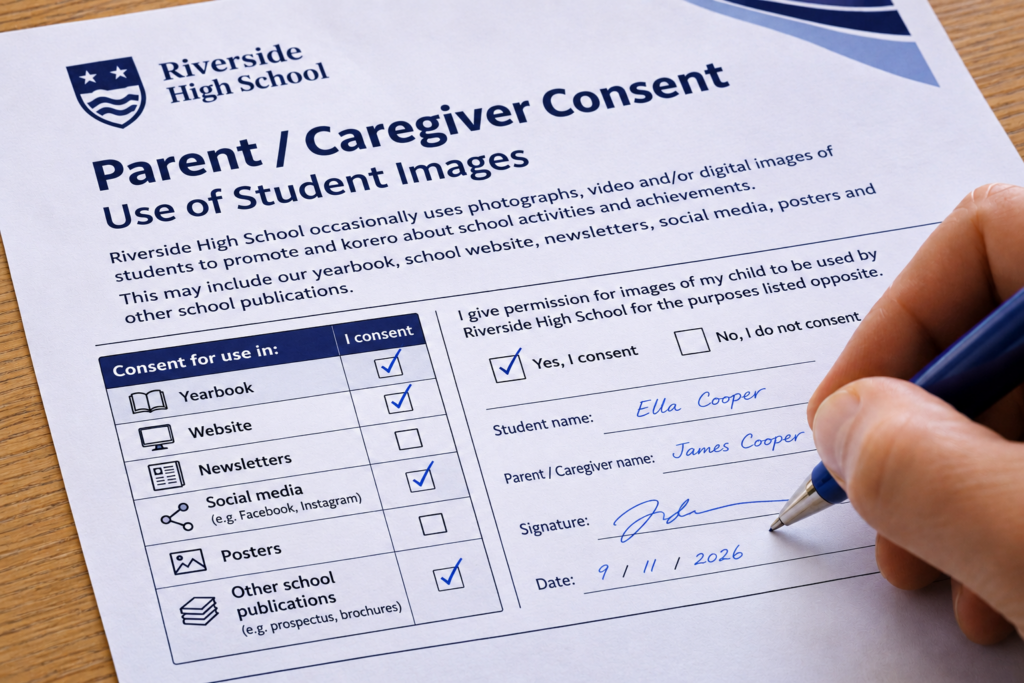
A yes to the printed newsletter is not a yes to a public Instagram account. The Privacy Commissioner says schools should get specific consent to use learners’ photos and videos in publications and update it each year.
- List each channel separately: newsletter, website, Facebook, Instagram, school app, yearbook, prospectus and local media.
- Refresh consent annually and ask secondary students themselves as well as their parents.
- Make withdrawal easy and take images down promptly when asked.
- Keep a current opt-out list that staff can check in seconds.
Protect students at risk
Some students must never appear online. Children under protection orders, in Oranga Tamariki care, or in families escaping violence can be located through a single photo showing their face and uniform. Flag these students confidentially in your student management system. Make sure everyone who takes or posts photos knows who they are, without sharing why, and check every group shot before it goes up.
Leave names off digital platforms
A face, a name and a uniform tell a stranger where a child spends their day. The Commissioner’s guidance advises against sharing names and ages with images. Caption the achievement, not the child. Don’t tag students, keep names out of alt text and file names, and watch for name badges, signed artwork and certificates in shot.
Strip metadata before sharing
Digital photos carry hidden data, including the date, the device and often the GPS location. Remove it before an image leaves your device and turn off camera location on school devices. Tag files by event, date and class, never by student name, and turn off face recognition in photo libraries.
| Device | How to remove location |
| Windows | Right-click the file, Properties, Details, then “Remove Properties and Personal Information” |
| Mac (Preview) | Tools, Show Inspector, then in the GPS tab choose “Remove Location Info” |
| iPhone | In the share sheet, tap Options and turn Location off |
| Android (Google Photos) | Remove the location in the photo’s details, or use the sharing setting to remove it |
Store images securely
IPP 5 requires reasonable safeguards against loss and misuse. Keep photos in one school-managed system, not on personal phones or USB sticks. If staff use their own phones, they should upload by the end of the day and then delete. Limit access, run social media from school accounts with multi-factor authentication, and publish lower-resolution copies online.
Set guidelines for photos others take
Parents filming at assemblies are generally outside the Privacy Act, but schools can still set expectations, such as asking families not to post other children online. Professional photographers, PTA and sports club pages, and visiting media should work from the school’s consent list too, under a written agreement where possible.
Review older images every year
Consent changes, students leave, and teenagers outgrow their Year 3 photos. Each year, when consent forms are refreshed, take down published images of students who have withdrawn or left, and review older posts. For state and state-integrated schools, photos are generally school records under the Public Records Act 2005, so removing a post does not mean deleting the original. Follow the School Records Retention and Disposal Schedule (Privacy Commissioner), and record what was reviewed and removed.

Name your Privacy Officer
Every school must have a privacy officer. Name them on consent forms and your website as the contact for questions, withdrawals and takedown requests, and make them responsible for the annual review. If a privacy breach causes, or is likely to cause, serious harm, they will need to notify the Privacy Commissioner and the people affected.
This post is general information about the Privacy Act 2020, not legal advice. For advice about your school’s situation, talk to a legal adviser or the Office of the Privacy Commissioner.